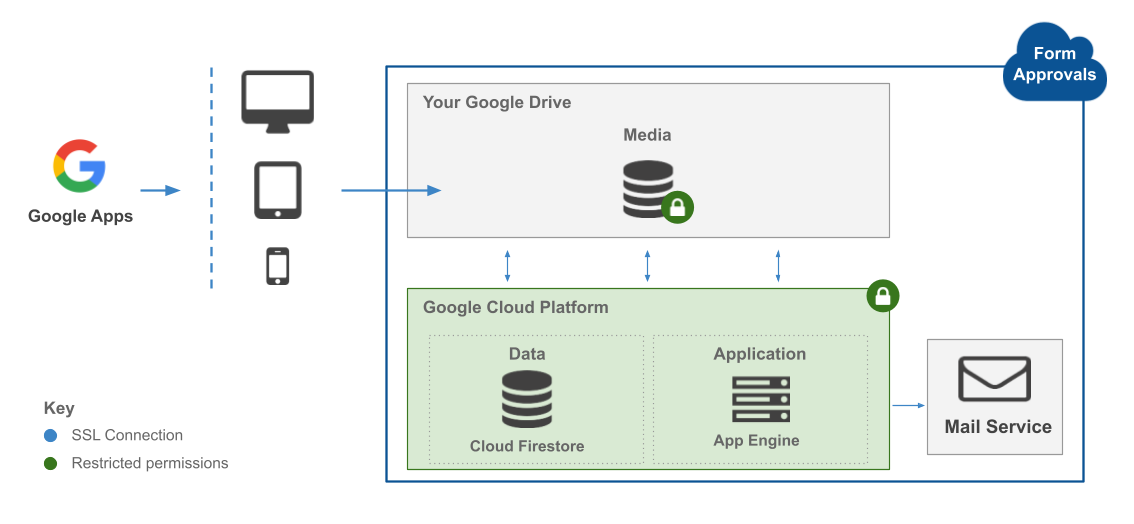
Protecting customer data is fundamental to how we build and operate Form Approvals. Our security program is aligned with industry standards and is underpinned by Google Cloud Platform's infrastructure. This page provides an overview of the technical and organizational measures we employ to safeguard your data.
Product Security
Form Approvals follows the principle of least privilege when requesting OAuth scopes. We only request access to the specific Google APIs necessary to deliver the service and do not request broader permissions than required.
During installation, the add-on will request authorization to operate on your account. The specific scopes requested and their purposes are outlined below.
Authorization scope
Purpose
Display and run third-party web content in prompts and sidebars inside Google applications
Required to render the add-on sidebar within Google Forms, where you configure recipients, recipient order, recipient logic, and other settings.
Allow this application to run when you are not present
Required for background processing of form submissions and delivery of notifications to requestors and recipients.
Connect to an external service
Required for the add-on to communicate with Google Cloud Firestore, where configuration and metadata are stored. See 'Data Storage' below.
View and manage your forms in Google Drive / See, edit, create, and delete all your Google Forms forms
Required to read form responses for notifications, create and edit forms via the Form Builder, and read form questions for workflow configuration.
Send email as you / Send email on your behalf
Required to send workflow notifications (submission confirmations, approval requests, and outcome notifications) from your account.
See, edit, create, and delete all your Google Sheets spreadsheets
Required to read and write approval records in the spreadsheet linked to your form. Google's OAuth model does not support scoping this permission to a single spreadsheet, however the add-on only accesses the spreadsheet linked to your form.
See, edit, create, and delete only the specific Google Drive files you use with this app
Required to access files you select as attachment templates for notifications. This is a narrow, file-level scope limited to files you explicitly choose.
Important notes:
The add-on does not have authorization to read emails in your email account. The gmail.send scope is used solely to send workflow notification emails from your account.
Unlike many add-ons, Form Approvals does not request broad Google Drive access. Access is limited to your Google Forms, linked Google Sheets, and any files you explicitly select as attachment templates.
Some scopes above include "delete" permission. The add-on does not delete your forms, spreadsheets, or files. Narrower scopes that exclude delete permission are not available from Google, and are required because the add-on needs to create and edit these resources.
All authorized scopes are used solely for delivering the service. No authorization is used for analytics, profiling, or any purpose other than providing the service to you.
The Form Approvals development and support teams have no access to your files. If you require technical assistance, we may request temporary access for troubleshooting purposes. You are under no obligation to grant access.
Your Google Workspace administrator can audit all third-party application activity using OAuth Token audit logs.
For additional isolation, you may choose to use a dedicated Google account (e.g., formapprovals@example.com) that only contains the Google Form and linked Google Sheet.
Form Approvals does not store your form submission data or approval records. This data remains in your Google Sheet and is accessed by the add-on at runtime using the authorization you provide.
The add-on is designed to minimize the data it stores. The only information persisted by the add-on in Google Cloud Firestore is the administrator's email address, OAuth authorization details, file metadata (e.g., Google Form ID, Google Sheet ID), and workflow configuration. If AI features are used, AI-generated field mappings (form category, semantic roles) are also stored. Usage and subscription data may also be stored.
This represents the minimum data required to operate the service. For a complete description of the data we collect, refer to our Privacy Policy.
All service data (configuration, credentials, subscriptions, and metadata) is stored in Google Cloud Firestore in the United States. The region you select during setup (US, EU, or AU) determines which application server handles your web requests for latency.
Your form response data and approval records are stored in your Google Sheet. The storage location for this data is governed by the data region policy configured by your Google Workspace administrator.
AI features (powered by Google Vertex AI) and email delivery (via AWS SES) are processed in the United States.
All add-on data is stored on Google Cloud Platform and subject to Google's data decommissioning procedures, including cryptographic erasure of storage media. For details on revoking access, data retention schedules, and requesting deletion, refer to our Privacy Policy (Sections 8 and 9).
The application is deployed on Google App Engine with automated health monitoring and alerting. Updates and patches are deployed promptly to address security vulnerabilities and performance issues, with minimal downtime.
Infrastructure Security
Form Approvals is deployed on Google Cloud Platform (GCP), leveraging GCP's built-in security controls including network isolation, DDoS protection, and hardware-level encryption. Application-level security controls are layered on top of GCP's infrastructure to protect customer data at every tier.
Access Control
All administrative accounts are protected by multi-factor authentication (MFA), including phishing-resistant FIDO2 security keys. Access to GCP resources is governed by the principle of least privilege, with permissions scoped to the minimum required for each role.
Google Cloud Identity and Access Management (IAM) enforces authentication and authorization policies across all user and service accounts, ensuring no account has broader access than necessary.
Data Security
Data is protected throughout its lifecycle using encryption, masking, and anonymization where applicable. Logical data segregation ensures that customer data is isolated and inaccessible to unauthorized parties.
All data in transit is encrypted using TLS. Data at rest is encrypted by default using GCP's server-side encryption, ensuring confidentiality and integrity at every layer.
Encryption keys are managed following industry best practices. Keys are protected by a regularly rotated hierarchy of master keys, safeguarding data even in the unlikely event of unauthorized storage access.
Email communications are encrypted using TLS. If the receiving mail server does not support TLS, the message is delivered over a plaintext SMTP connection as a fallback.
Secure Development Lifecycle
Security is embedded throughout our development lifecycle. All code changes undergo peer review and static analysis before deployment. Automated security testing is integrated into our build pipeline to identify vulnerabilities before they reach production.
Our team follows secure coding practices aligned with OWASP guidelines, including input validation, output encoding, and protection against common web application vulnerabilities.
Email Security
All emails sent from the formapprovals.com domain are authenticated using DKIM, SPF, and DMARC, providing recipients with verifiable proof of origin and protection against spoofing.
Emails are sent over TLS-encrypted connections by default. If the recipient's mail server does not support TLS, delivery falls back to a plaintext SMTP connection.
Approval and tracking links direct users to a subdomain of formapprovals.com. Organizations using URL protection or rewriting services may need to allowlist our domain. One-click approvals can be disabled upon request by contacting Form Approvals support.
Data Handling
All employees complete data handling training. Access to customer data is restricted to developers who require it for support purposes, and only with the customer's consent. All developer accounts are secured with FIDO-compliant physical security keys.
Vulnerability Management
We maintain a proactive vulnerability management program that includes annual penetration testing, periodic application-level security reviews, continuous web application scanning, dependency vulnerability scanning, and static code analysis. Identified vulnerabilities are triaged by severity and remediated according to defined SLAs.
Third Party Security
All third-party service providers are assessed for security practices before onboarding. We evaluate vendors against criteria including data handling policies, encryption standards, access controls, and compliance certifications to ensure they meet our security requirements.
Disaster Recovery
Application data is backed up on a regular schedule to Google Cloud Storage. Backups are encrypted and stored in a separate location to ensure recoverability in the event of data loss or infrastructure failure.
Compliance
Payment processing is handled by Stripe, a PCI DSS Level 1 certified service provider. Form Approvals does not directly process, store, or transmit cardholder data. All payment transactions are handled entirely within Stripe's secure infrastructure.
Our infrastructure runs on GCP data centers that maintain ISO 27001 and SOC 2 Type II certifications, providing independent assurance of the security, availability, and confidentiality controls in place.
Incident Response
We maintain a documented incident response plan that defines procedures for detection, containment, eradication, and recovery. In the event of a confirmed data breach involving your data, we will notify affected customers promptly and in accordance with applicable data protection laws.
How to Contact Us
If you have security-related questions or need to report a vulnerability, please contact security@formapprovals.com. We are committed to responding to all security inquiries promptly.